
Articles · Published · Prices checked · By Goulah
Missed Call Text Back for Contractors: Set It Up in HighLevel (2026)
Disclosure: I earn a commission if you buy through my links in this article (marked "my link"). It doesn't cost you anything extra. I'm a HighLevel affiliate; HighLevel didn't review or approve this guide. Every menu path and fee below comes from HighLevel's own help center, linked, checked November 15, 2026. No screenshots here are from anyone else's account.
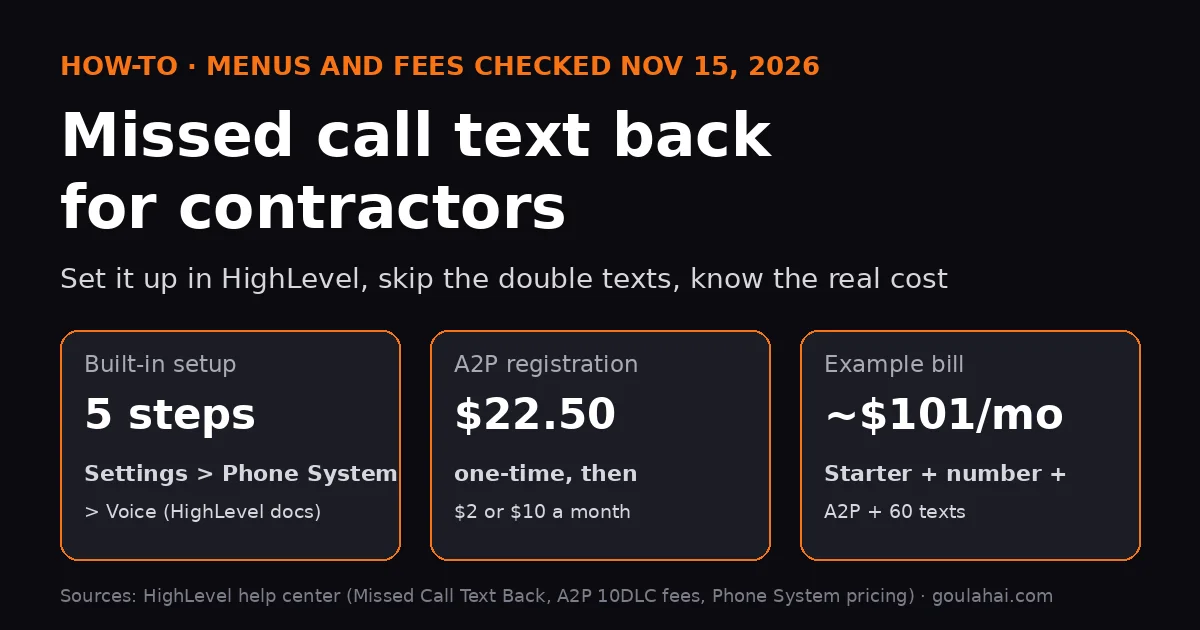
As of November 15, 2026, you turn on missed call text back in HighLevel (GoHighLevel) under Settings > Phone System > Voice > Voicemail & Missed Call Text Back: tick Enable, write your text, send a test, save. Before it can text US cell phones you need a HighLevel phone number ($1.15/month) and A2P 10DLC texting registration ($22.50 one-time, then $2 or $10 a month). The built-in setting texts every missed call, even a caller who rings three times, so most contractors are better off with the workflow version in Part 2.
Use the built-in setting if you're a one-truck operation and just want something live today. Five clicks, one message.
Use the workflow version if you have a crew, an office person, or customers who call back-to-back. It sends one text per caller, tags the lead, and pings you.
Budget: my example roofer with 60 missed calls a month comes to about $101/month on the $97 Starter plan, plus $22.50 once for registration (math below).
See HighLevel plans (my link) →I earn a commission if you buy HighLevel through my link. Texts, calls and registration are billed on top of the plan.
Why missed calls hurt a contractor more than most
I work construction. When you're on a ladder, under a sink or running a saw, the phone in your pocket doesn't get answered, and the homeowner who called just goes down the list to the next roofer or plumber. A text that lands right after the missed call says "we saw you, we're on it" and gives them a way to answer without calling again. That's the whole job of this feature. It won't fix a bad price or a slow callback, but it keeps the lead from going cold while your hands are full.
Menu names checked Nov 15, 2026 against HighLevel's help articles: Missed Call Text Back (modified Sep 7, 2026) and Workflow Trigger: Call Details. HighLevel renames menus now and then; if yours look different, search the help center for the feature name.
What you need before you start
- A HighLevel account. Starter is $97/month (3 sub-accounts), which covers one contracting business. You'll need a HighLevel account (my link).
- A HighLevel (LC Phone) number that customers call, or that your business line forwards unanswered calls to. Local numbers are $1.15/month (Phone System pricing guide).
- An approved A2P 10DLC registration in the Trust Center. US carriers require it for business texts from local numbers; if no number in your account is eligible, HighLevel logs the text as failed. Register under your exact legal business name (match your EIN paperwork) and pick a customer-care/conversational use case, not marketing.
- Your text, written in your voice. Templates by trade are further down.
Part 1: The built-in setting (5 steps)
- Open Settings. In your sub-account, click Settings in the bottom-left corner.
- Go to the feature. Click Phone System in the left menu, then Voice in the top bar, then Voicemail & Missed Call Text Back, then Missed Call Text Back in the side panel.
- Turn it on. Tick Enable Missed Call Text Back, then click Customize.
- Write the message. Type it in Enter message. You can insert the contact's name, but it only fills in if HighLevel already knows the caller, so write a message that reads fine without it.
- Test and save. Send a test to your own cell, check how it looks, then click Save.
You should see: the next call that rings past your timeout without being answered gets your text automatically. Answered calls never trigger it.
Set the ring timeout too. In the same Voicemail settings, the incoming call timeout slider decides when a call counts as missed. HighLevel recommends 10 to 20 seconds. Too long and the text is slow; too short and you cut off calls you'd have picked up.
Part 2: The workflow version (one text per caller)
HighLevel's own help doc warns that the built-in setting "triggers an SMS notification for every missed call — even if the same caller tries multiple times within a brief timeframe," and recommends a workflow with a wait step or tags instead. Here's that version, built from the Call Details trigger doc:
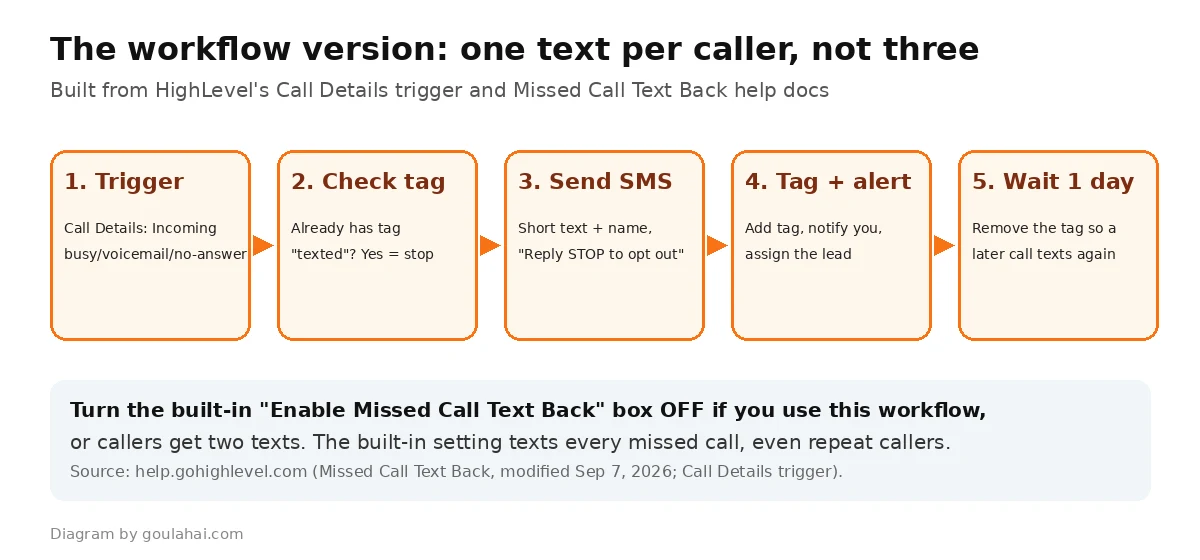
- Turn off the built-in box first. Untick Enable Missed Call Text Back from Part 1, or callers get two texts.
- Create the workflow. Go to Automation > Workflows > Create Workflow. You can start from scratch or load HighLevel's missed call text back recipe and edit it.
- Add the trigger. Click Add New Trigger, choose Call Details (under Events), set Call Direction = Incoming and Call Status = busy, voicemail and no-answer. Optional: In Phone Number to limit it to your main line.
- Stop repeat texts. Add an If/Else that checks for a tag like missed-call-texted. If the contact has it, end there.
- Send the text. On the "no tag" branch, add Send SMS with your message.
- Tag and alert. Add the missed-call-texted tag, then an Internal Notification to you or the office with the caller's number. Assign the contact to whoever calls back.
- Reset later. Add a Wait (one day works), then Remove Contact Tag, so the same customer calling next week gets a fresh text. HighLevel's example is a wait of about 20 minutes if you'd rather keep it short.
- Publish. Switch the workflow from Draft to Publish and save. Then call your number from another phone, let it ring out, and call again right away to check you only get one text.
You should see: one text after the first missed call, nothing on the second, and the contact showing in the workflow's enrollment history.
Exact settings at a glance
| Setting | What to pick | Why |
|---|---|---|
| Incoming call timeout | 10-20 seconds | HighLevel's recommended range |
| Built-in Enable box | On for Part 1, off for Part 2 | Both on = two texts |
| Trigger | Call Details: Incoming; busy, voicemail, no-answer | Only missed inbound calls, never your own outgoing ones |
| Repeat-caller check | If/Else on a tag, cleared after a wait | One text per caller |
| Message | Business name, short question, "Reply STOP to opt out" | Clear sender and opt-out, as A2P reviewers expect |
| Name merge field | Skip it or write around it | Only fills in for callers already in your contacts |
Text templates by trade
Keep it conversational. A missed-call reply is customer care; once you add a sale ("10% off gutters this week") it reads like marketing, and marketing texts need written consent. Swap in your business name.
| Trade | Message |
|---|---|
| Roofing | Hi, it's [Business] Roofing. Sorry I missed you, I'm up on a roof. Is this about a leak or an estimate? Text me back here. Reply STOP to opt out. |
| Plumbing | Hi, this is [Business] Plumbing. Sorry we missed your call. Is it an emergency or can it wait for a scheduled visit? Reply here. Reply STOP to opt out. |
| Electrical | Hi, [Business] Electric here. Missed your call, we're on a job. What's going on, and what's the address? Reply STOP to opt out. |
| Framing / remodel | Hey, it's [Name] with [Business]. Can't grab the phone on site. What kind of project is it? I'll text back on my break. Reply STOP to opt out. |
| After hours | Thanks for calling [Business]. We're closed for the day. Text us what you need and we'll reply first thing in the morning. Reply STOP to opt out. |
For a different after-hours text, add an If/Else with a time condition before the Send SMS step in the workflow.
Where this goes wrong (the catch)
On r/gohighlevel, a business owner testing missed call text back on their own company wrote that they "cannot get A2P compliant at all" and that HighLevel support was "basically telling me its not possible" (Reddit, March 2026). Replies in that thread and a similar one say it can be approved when the campaign is registered as customer care, the opt-in is explained (the customer called you first), the sample message names the business and includes STOP, and your website explains how you use texts.
How to avoid it: register as customer care/conversational, use your exact legal name, put an SMS line and privacy policy on your website, and keep sales offers out of the auto-text. Note that HighLevel's fees start when you submit, even if you get rejected, though resubmitting a rejected campaign costs nothing extra (pricing guide; A2P fee page).
- Repeat callers get spammed. The built-in setting texts every missed call. Use Part 2.
- Two texts per call. Built-in box and workflow both on. Turn one off.
- The text comes from a different number. If the number they called can't text (a call-tracking or unverified toll-free number), HighLevel sends from another eligible number in your account. That's on purpose, per the help doc.
- No text at all. Check in this order: is the call logged as missed (your forwarding or cell voicemail may have "answered" it), is A2P approved and the number linked, is the contact on DND (HighLevel respects it), and is the workflow published, not a draft.
- Texts cost money. They count toward your messaging usage and come out of your wallet, which auto-recharges your card. Set your wallet minimum and recharge amount before going live.
Ready to stop losing jobs to voicemail?
Starter ($97/month) covers one contracting business with missed call text back, two-way texting, booking and review requests. Compare plans on HighLevel's own page.
See HighLevel plans (my link) →I earn a commission if you buy through my link. Phone numbers, texts, calls and A2P registration are billed on top. Prices checked Nov 15, 2026.
What it really costs per month
| Item | Price (HighLevel's listed rate) | Monthly |
|---|---|---|
| HighLevel Starter plan | $97/month | $97.00 |
| Local phone number | $1.15/month | $1.15 |
| A2P campaign fee | $2/month sole proprietor ($10 standard) | $2.00 |
| 60 auto-texts out | $0.00747/segment + carrier fee (up to $0.005, Verizon) | $0.75 |
| 30 replies in | $0.00747/segment + carrier fee (up to $0.007, Verizon) | $0.43 |
| Total | $101.33 ($109.33 on a standard campaign) | |
| One-time A2P registration | Sole proprietor or low-volume standard | $22.50 once |
The roofer, 60 missed calls and 30 replies are a made-up example to show the math; one-segment texts (160 characters or less). Not included: call minutes (inbound in the app $0.0129/min; forwarded to your cell $0.02/min), and the rest of your HighLevel use. Sources: HighLevel pricing, Phone System pricing guide (modified Oct 12, 2026), A2P 10DLC fees (modified Nov 10, 2026), all checked Nov 15, 2026. The texting itself is about a dollar; the plan is the real cost, so it only makes sense if you'll use HighLevel's other tools (booking, reviews, follow-up) too, or if one saved job a month is worth more than about $101 to you.
Watch it working
A third-party walkthrough of the workflow version, including a live test call. Video by Gijs Marketing (not me). It uses HighLevel's recipe as-is, which doesn't have the repeat-caller tag check from Part 2, so add that step.

FAQ
Where is missed call text back in GoHighLevel?
Settings > Phone System > Voice > Voicemail & Missed Call Text Back, then Missed Call Text Back in the side panel (HighLevel help).
Why does it text the same customer three times?
The built-in setting sends a text on every missed call. Use a workflow with a tag check or wait step (Part 2), and turn the built-in box off.
Do I need A2P 10DLC registration?
Yes, to text US mobile numbers from a local number. It's $22.50 one-time for sole proprietor or low-volume standard brands, plus $2 to $10 a month per campaign, passed through with no HighLevel markup per its fee page.
Can I keep my existing business number?
You can forward unanswered calls from your current line to a HighLevel number, but make sure your carrier or cell voicemail doesn't pick up first, or the call won't count as missed in HighLevel.
Will it text someone who's on Do Not Disturb?
No. HighLevel respects contact DND and communication preferences.
Can it reply with AI instead of a fixed text?
HighLevel offers conversation AI as a paid add-on (its AI Employee Growth plan is $50/month per sub-account on the pricing page). Start with a plain text; add AI later if the volume justifies it.
Is a missed call text back a marketing text?
Not if it only responds to the call. Adding a discount or promo makes it marketing, which needs written consent. Keep the auto-text to "sorry we missed you, how can we help."
Next decision: is HighLevel the right tool for you?
- Every plan and usage fee: GoHighLevel Pricing 2026
- Comparing tools: GoHighLevel vs ClickFunnels 2026
- Want an AI voice agent to call leads back instead? ElevenLabs Campaign Manager
Texts catch the leads you already get.
Set it up on your own account
Pick a plan, buy a local number, submit A2P, then follow Part 2 above.
See HighLevel plans (my link) →I earn a commission if you buy through my link. It doesn't cost you anything extra. No results are promised; it depends on how fast you call back.
Official sources
- HighLevel: Where and how to configure Missed Call Text Back (modified Sep 7, 2026)
- HighLevel: Workflow Trigger: Call Details
- HighLevel: A2P 10DLC messaging fees (modified Nov 10, 2026)
- HighLevel: Phone System pricing and billing guide (modified Oct 12, 2026)
- HighLevel pricing page