
Articles · Published · By Goulah
Descript vs CapCut 2026: Which AI Video Editor Fits Your Videos?
Disclosure: I earn a commission if you buy through my links in this article (marked "my link"). It doesn't cost you anything extra. I'm a Descript affiliate, and Descript may pay me a one-time fee if you start a paid plan through my link. I'm not paid by CapCut or Blackmagic Design, and none of these companies reviewed or approved this article. This is a research-based comparison from the official pricing pages, help docs and published user reviews (checked November 11, 2026), not a hands-on test.
If you make videos, you've probably narrowed it down to two names: Descript and CapCut. They both have AI tools, they both have a free plan, and people argue about them constantly. But they're built for different jobs, and picking the wrong one means paying for a tool that fights you every time you edit.
Here's the plain version: what each one is good at, what it really costs, the catch nobody puts in the headline, and which one I'd point you to for your kind of videos.
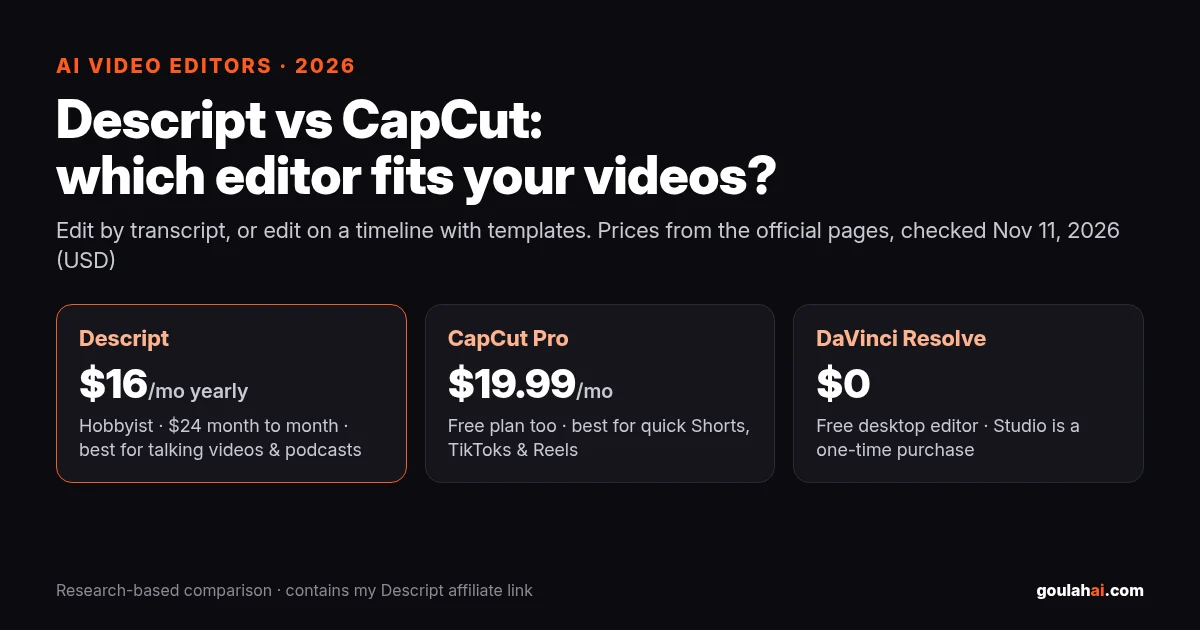
Pick Descript if your videos are mostly people talking: podcasts, interviews, tutorials, talking-head YouTube. You edit by deleting words in the transcript, like a doc, and cleanups like removing filler words are built in. Paid plans start at $16/month billed yearly (Hobbyist, $24 month to month), and Creator is $24/month yearly ($35 monthly).
Pick CapCut if you make quick Shorts, TikToks and Reels with effects, templates, music and auto captions, especially on your phone. The free plan goes a long way; Pro lists at $19.99/month.
Pick DaVinci Resolve if you want a pro desktop editor for $0 and don't mind a learning curve.
See Descript plans (my link) →I'm a Descript affiliate. If you start a paid Descript plan through my link, Descript may pay me. It doesn't cost you anything extra.
Descript vs CapCut vs DaVinci Resolve at a glance
| Editor | Best for | Price to start | One honest downside | |
|---|---|---|---|---|
| Descript | Podcasts, interviews, tutorials and talking-head videos you want to edit like a document | Free plan; Hobbyist $16/mo yearly or $24 monthly; Creator $24/mo yearly or $35 monthly | AI tools run on monthly AI credits that don't roll over, and users complain they run out fast | See plans (my link) Descript affiliate; I may be paid. |
| CapCut | Fast Shorts, TikToks and Reels with templates, effects and auto captions, on phone or desktop | Free plan; Pro $19.99/mo (CapCut calls the listed price "for reference only") | The yearly Pro price more than doubled in early 2026 (per Newsweek), and its terms give CapCut a broad license to what you upload | Official pricing |
| DaVinci Resolve | People who want a full pro editor with no monthly bill and will put in time to learn it | Free; Studio is a one-time purchase ($236 on sale from $295 when I checked) | Steepest learning curve of the three, and text-based editing is a Studio feature, not free | Official site |
Only the Descript link is an affiliate link. Sources: Descript pricing, CapCut pricing, DaVinci Resolve, all checked Nov 11, 2026. Prices in USD and can change by region.
The real difference: transcript vs timeline
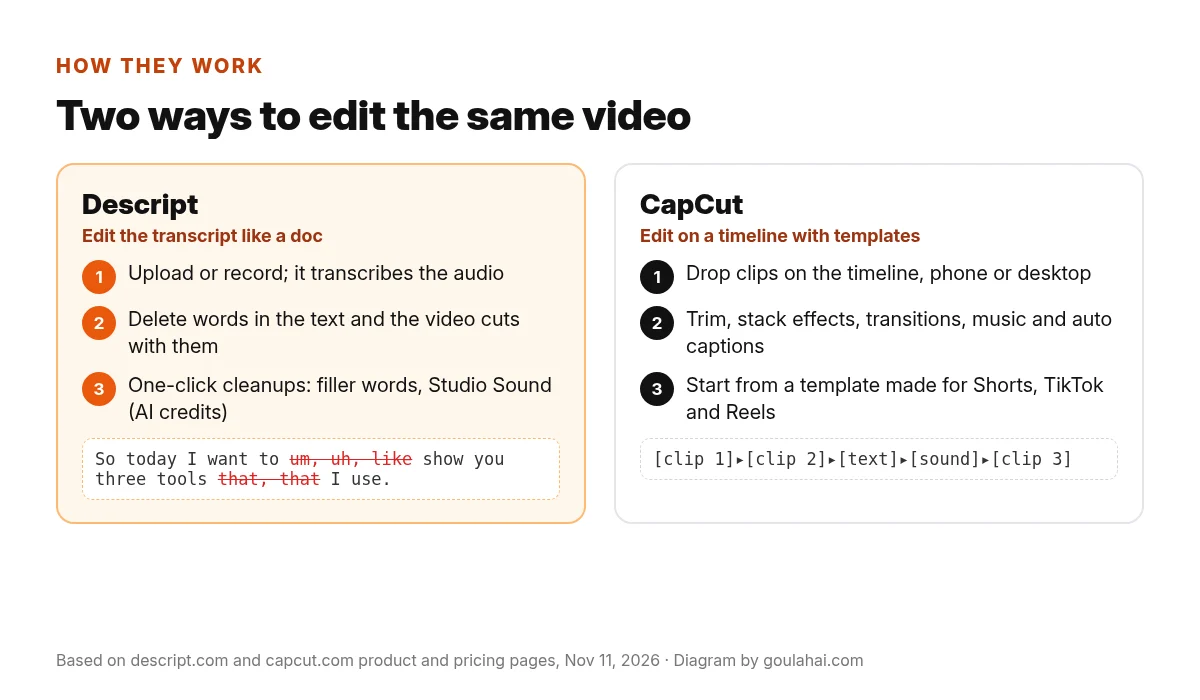
Descript turns your recording into a transcript, and the transcript is the editor. Delete a sentence in the text and it's gone from the video. Its pricing page lists AI tools like Studio Sound (cleans up background noise), Remove Filler Words, Eye Contact, Create Clips, and an AI co-editor called Underlord, plus AI voice clones on paid plans. If you talk for a living, that's a big time saver on paper: you're reading, not scrubbing a timeline.
CapCut is a classic timeline editor from the same family of apps as TikTok. You stack clips, text, music and effects, and you can start from templates made for short vertical video. It runs on phones, desktop and the web, which is why so many people cut Shorts on it. Pro adds premium templates and effects, 1,200 monthly AI credits and 1 TB of cloud storage (CapCut pricing).
So the question isn't "which is better." It's "is my video a conversation, or a montage?"
Descript plans (2026)
| Free | Hobbyist | Creator | Business | |
|---|---|---|---|---|
| Billed yearly | $0 | $16/mo | $24/mo | $50/mo |
| Month to month | $0 | $24/mo | $35/mo | $65/mo |
| Media hours / month | 1 | 10 | 30 | 40 |
| AI credits / month | — | 400 | 800 | 1,500 |
| Export | 720p | 1080p, no watermark | 4K | 4K |
| Top-ups for more hours/credits | — | Not listed | Yes | Yes |
Source: Descript pricing, per person, checked Nov 11, 2026. The page shows yearly prices by default; click Monthly to see the higher month-to-month price. Students, educators and nonprofits can apply for special rates there.
The catch with each one
Descript: AI credits and media hours run out
Every Descript plan has two meters. Media hours count everything you upload or record, whether or not you transcribe it. AI credits get spent every time you use an AI feature like Underlord, Studio Sound, Remove Filler Words, Green Screen or Eye Contact. Descript's help center says unused minutes and credits don't roll over to the next month (Descript Help).
On Descript's own subreddit, a user who switched to the new Creator pricing wrote that "some features are eating my credits so much." One reply explained where it goes: "the sneaky ones are eye contact and running underlord more than once on the same file, each pass charges you separately" (r/Descript, March 2026). Another Creator user said they ran out of credits and media minutes "at an absurd pace" (r/Descript, April 2026). A Descript staff member replied there that support can review usage and often returns credits when something went wrong.
How to avoid it: do the simple cuts by hand first, then run the AI tools once on the cleaned-up version, not three times. Turn on the on-screen credit balance and check the usage page in settings (how). And don't upload hours of raw footage you'll never use, because it all counts against media hours.
Two smaller things: the yearly price is the one you see first, so the month-to-month bill is 50% higher on Hobbyist ($24 vs $16). And live chat support runs Monday to Friday, 5 a.m. to 5 p.m. Pacific, per the pricing page, so a Saturday-night export problem waits until Monday.
CapCut: the price jump and the license in the terms
Price. In early 2026 CapCut moved to new plans, and Newsweek reported that the yearly Pro price went from about $77 to $179.99, with no formal announcement (Newsweek, Feb 17, 2026). CapCut later said the upgraded Pro plan raised AI points from 550 to 1,200 and storage from 100 GB to 1 TB, and that the old price is no longer offered to new subscribers (CapCut: Understanding the pricing change). Its pricing page also says displayed prices are "for reference only," so your account may see something different.
Terms. CapCut's US terms (last updated April 15, 2026) give the company and its partners a "non-exclusive, royalty-free, fully transferable, sub-licensable, perpetual and worldwide license to use your User Content" for running and developing the service, "subject to your Platform settings," plus a license to use your username, image and likeness to identify you as the source of your content, "including for use in sponsored content" (CapCut Terms of Service). CapCut says it has never claimed ownership of users' work and the license is only what it needs to run features like templates and sharing (CapCut's explanation). That may be fine for your own TikToks. If you edit client videos, paid talent or anything under an exclusive deal, read that section first.
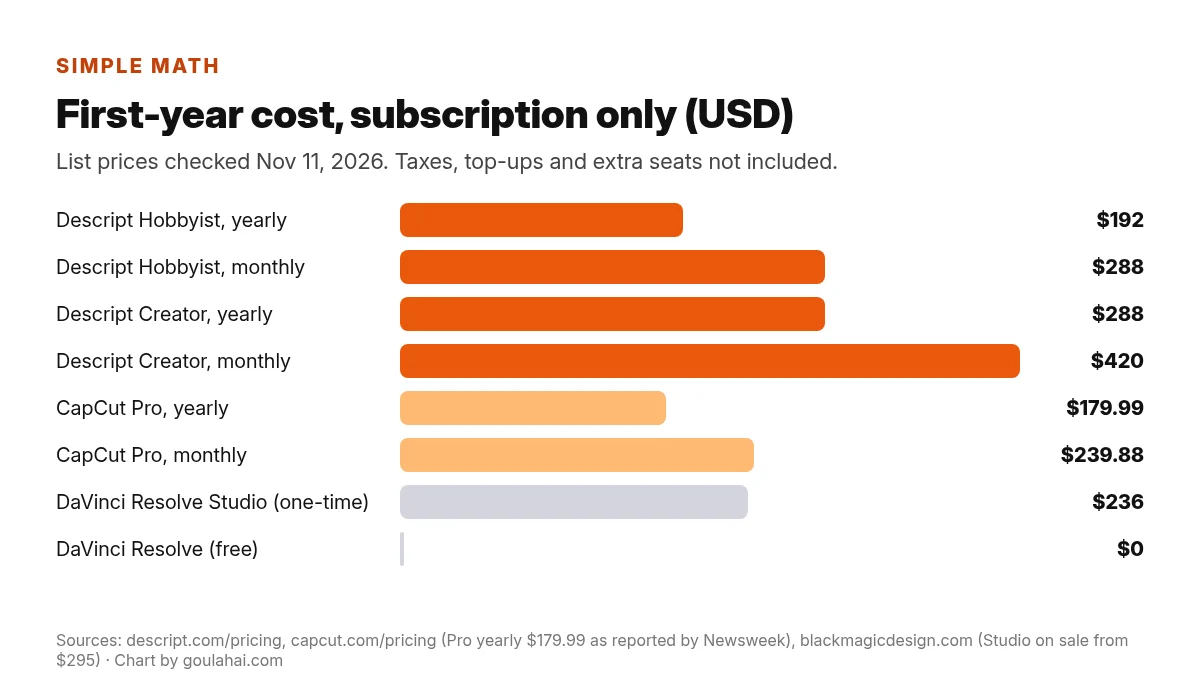
- Descript Hobbyist: $16 × 12 = $192 billed yearly, or $24 × 12 = $288 month to month.
- Descript Creator: $24 × 12 = $288 yearly, or $35 × 12 = $420 monthly.
- CapCut Pro: $179.99 yearly, or $19.99 × 12 = $239.88 monthly.
- DaVinci Resolve: $0, or $236 once for Studio (sale price when I checked; normally $295).
Per episode example: say you upload four 1-hour podcast episodes a month. That's about 4 media hours, which fits inside Hobbyist's 10. On yearly billing that's $16 ÷ 4 = $4 an episode; month to month it's $6. If you record each person on a separate track or upload long raw footage, count all of it, because media hours track everything you upload.
The four 1-hour episodes are a made-up example to show the math. Prices from the official pages linked above, checked Nov 11, 2026. CapCut's yearly price is as reported by Newsweek and third-party price trackers; CapCut shows your exact price after you sign in.
Mostly talking on camera or on a mic?
That's where editing by transcript makes the most sense. Descript has a free plan, so you can see if the workflow clicks before you pay. Then pick yearly or monthly with the credit catch in mind.
See Descript plans (my link) →I'm a Descript affiliate. If you start a paid Descript plan through my link, Descript may pay me. It doesn't cost you anything extra. Prices checked Nov 11, 2026.
Which one should you pick?
- Choose Descript if you make podcasts, interviews, courses, tutorials or long YouTube videos where people talk, you'd rather read than scrub a timeline, and you want filler-word removal and audio cleanup in the same app. It's also a natural fit if you want to pull show notes and chapters from the transcript (here's my show notes and chapters workflow).
- Choose CapCut if you mostly make 15 to 60 second vertical videos, you like templates, trending effects and music, and you edit on your phone. Start on the free plan; only pay when you keep hitting a Pro-only feature.
- Choose DaVinci Resolve if you want a pro editor with no subscription and you're willing to learn it, or you're doing client work and want your files on your own computer.
- Use both if you edit a long talking video in Descript, then cut Shorts with flashy captions in CapCut.
Watch: Descript's own start-to-finish edit, and a three-way test
Descript's official channel walks through editing a video from start to finish, so you can see the transcript workflow before you sign up.

And creator Ashley Pacini compares Descript, CapCut and Premiere Pro side by side.

Pros and cons
Descript
- Pro: edit video by editing text
- Pro: filler-word removal, Studio Sound, clips and voice clones in one app
- Pro: built-in remote recording for interviews
- Con: AI credits and media hours don't roll over
- Con: Hobbyist lists no top-ups, so running out means upgrading
- Con: live chat support is weekdays only
CapCut
- Pro: generous free plan on phone, desktop and web
- Pro: templates, effects and auto captions made for Shorts
- Pro: 7-day Pro trial for new users with no card, per CapCut
- Con: yearly Pro price more than doubled in 2026, per Newsweek
- Con: broad content license in the terms
- Con: shown prices are "for reference only" and vary by account
FAQ
Is Descript better than CapCut?
For talking videos like podcasts, interviews and tutorials, Descript's transcript editing is usually faster. For short, effects-heavy vertical videos, CapCut is usually the better fit. They do different jobs.
How much does Descript cost in 2026?
Free, then Hobbyist $16/month billed yearly ($24 monthly), Creator $24 ($35), Business $50 ($65), per person, with Enterprise custom (source).
How much is CapCut Pro?
CapCut's pricing page lists Pro at $19.99/month in the US and says prices are for reference only. Newsweek and price trackers report the yearly plan at $179.99.
Do Descript's AI credits roll over?
No. Descript says unused media minutes and AI credits reset each billing cycle and don't carry over (source).
Does Descript have a free plan?
Yes. The Free plan includes 1 media hour a month and 720p export, and Descript says you don't need a credit card for it.
Does CapCut own my videos?
CapCut says it has never claimed ownership of users' work. Its terms do grant it a broad, perpetual, transferable license to use your content to run and develop the service, plus use of your name and likeness to identify you as the creator. Read the User Content section if you do client work.
Is there a free alternative to both?
DaVinci Resolve's free version is a full desktop editor. Its paid Studio version is a one-time purchase and adds text-based editing and more AI tools (source).
My take
If your content is you talking, I'd start with Descript: edit the transcript, clean the audio, pull a few clips. If it's quick vertical videos with effects, start free on CapCut and don't pay until you need to.
See Descript plans (my link) →I'm a Descript affiliate. If you start a paid Descript plan through my link, Descript may pay me. It doesn't cost you anything extra.
Sources
- Descript pricing and plan comparison
- Descript Help: media minutes and AI credits
- r/Descript: "I don't like new Descript pricing" (March 2026)
- r/Descript: running out of media minutes and AI credits on Creator (April 2026)
- CapCut pricing
- CapCut: Understanding the pricing change (Mar 25, 2026)
- Newsweek: CapCut nearly doubles its subscription price (Feb 17, 2026)
- CapCut Terms of Service (US, updated Apr 15, 2026)
- CapCut: About CapCut's Terms of Service (Jun 24, 2025)
- Blackmagic Design: DaVinci Resolve
- Descript on YouTube: How to Edit a Video from Start to Finish
Prices and features are from the pages above as of November 11, 2026 and can change or vary by country. goulahai.com is not Descript, CapCut or Blackmagic Design and doesn't speak for them. More guides on the goulahai.com homepage, including how to find the best short clips in a long video with AI and how to make accurate captions with AI.